
Basic Thermometry Concepts: Recording Features
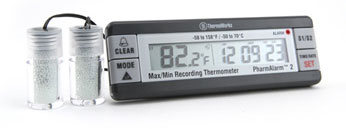 One of the most valuable features of today's thermometers is the ability to view, record and manipulate the measurements that you take. Here are a few advanced features included in some of our more dynamic thermometers:
- Recording maximum and minimum (Max/Min) temperatures is a very helpful feature, particularly when trying to determine if a target has been kept within designated temperature boundaries over an extended period of time - as with data logging. Thermometers with Max/Min functionality display the highest and lowest temperatures encountered. Some mechanical thermometers do this with physical markers that get pushed up or down over time, but Max/Min is more common with electronic instruments. *Note that electronic instruments with Max/Min often do not have auto-off feature since turning an instrument off resets its Max/Min recordings.
- Hold is a feature that allows you to freeze a displayed measurement (usually a digital reading) for later consultation.
- Differential Recordings (Diff.), display the product of subtracting the minimum temperature encountered from the maximum temperature encountered, showing the range of deviation over a span of time.
- Average temperature recordings (Avg.), simply averages all the measurements encountered over a span of time.
- High and Low Alarms alert you (by blinking, beeping or even sending you an email or text message) when a measurement has gone above or below a certain preset temperature.
- Auto-off is a feature that shuts the instrument off after a specified amount of time to protect long-term battery life. Some units also come with the ability to disable this feature for more extended measurements